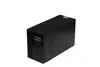
UPS power supply
Reliable UPS Power Supply Solutions for Uninterrupted Performance
In today's digital world, a dependable UPS power supply is essential for protecting critical equipment from power disturbances. Our high-quality UPS systems provide seamless backup power during outages and protect your devices from voltage fluctuations.
Key Features of Our UPS Power Supply Systems
- Pure Sine Wave Output - Delivers clean, stable power for sensitive electronics
- High Efficiency - Up to 95% efficiency in double conversion mode
- Scalable Runtime - Expandable battery modules for extended backup
- Intelligent Monitoring - Network management capabilities for remote control
- Multiple Protection - Safeguards against surges, spikes, and electrical noise
UPS Power Supply Product Specifications
| Model | Capacity | Input Voltage | Output Voltage | Battery Runtime | Dimensions |
|---|---|---|---|---|---|
| UPS-1000 | 1000VA/700W | 100-240VAC | 230VAC ± 2% | 8-15 minutes | 150 x 86 x 225mm |
| UPS-2000 | 2000VA/1400W | 100-240VAC | 230VAC ± 2% | 10-20 minutes | 220 x 130 x 330mm |
| UPS-3000 | 3000VA/2100W | 100-240VAC | 230VAC ± 2% | 15-30 minutes | 280 x 150 x 380mm |
UPS Power Supply FAQ
Q: How often should I replace the batteries in my UPS power supply?
A: UPS batteries typically last 3-5 years under normal operating conditions. We recommend testing batteries annually after the first two years and replacing them when they can no longer hold at least 80% of their rated capacity. Environmental factors like temperature and frequency of discharge cycles can affect battery lifespan.
Q: Can a UPS power supply protect against all types of power problems?
A: While a UPS power supply provides excellent protection against most common power issues including blackouts, brownouts, and voltage spikes, it cannot protect against wiring faults or direct lightning strikes. For complete protection, we recommend using the UPS in conjunction with proper surge protection devices and following all electrical safety guidelines.
Q: What's the difference between line-interactive and online UPS power supply systems?
A: Line-interactive UPS systems regulate voltage automatically and switch to battery when power fails, while online (double conversion) UPS systems continuously convert AC to DC and back to AC, providing complete isolation from power line problems. Online UPS offers superior protection but is typically more expensive and slightly less efficient than line-interactive models.
Advanced UPS Power Supply Technologies
Our latest generation UPS power supply units incorporate cutting-edge technologies to meet modern power protection needs:
- Advanced lithium-ion battery options with longer lifespan
- Eco-mode operation for improved energy efficiency
- Automatic voltage regulation (AVR) for stable output
- Hot-swappable battery modules for uninterrupted operation
- LCD displays with intuitive status indicators
Selecting the Right UPS Power Supply
When choosing a UPS power supply, consider these key factors:
| Application | Recommended UPS Type | Runtime Needs |
|---|---|---|
| Home Office | Standby or Line-interactive (500-1500VA) | 5-15 minutes |
| Server Room | Online/Double Conversion (2000-5000VA) | 15-30 minutes |
| Medical Equipment | Online with Isolation Transformer | 30+ minutes |
UPS Power Supply Maintenance Tips
To ensure optimal performance and longevity of your UPS power supply system:
- Keep the unit in a cool, dry environment with proper ventilation
- Perform regular self-tests as recommended by the manufacturer
- Clean air vents periodically to prevent dust accumulation
- Monitor battery status and replace when performance declines
- Update firmware when new versions become available
UPS Power Supply FAQ (Continued)
Q: Can I connect a laser printer to a UPS power supply?
A: It's not recommended to connect laser printers directly to a UPS power supply as their high power demands during operation can overload the unit. Instead, connect the printer to a surge protector while using the UPS for your computer and other sensitive equipment. Some high-capacity UPS systems may handle printers, but always check the specifications first.
Q: How do I calculate the right size UPS power supply for my needs?
A: To properly size a UPS power supply, first add up the wattage of all equipment you need to protect. Then multiply this total by 1.25 to 1.5 to allow for startup surges and future expansion. Finally, choose a UPS with a VA rating equal to or greater than this calculated value. Our online sizing calculator can help simplify this process.
Q: What does "automatic bypass" mean in UPS power supply specifications?
A: Automatic bypass is a safety feature that allows the UPS to automatically transfer the load to utility power if the UPS experiences an internal fault or overload condition. This prevents complete power loss while alerting users to the need for service. High-end UPS systems often include both static and maintenance bypass capabilities for added reliability.
Industrial-Grade UPS Power Supply Options
For mission-critical applications requiring superior reliability:
| Model | Capacity Range | Redundancy Options | Certifications |
|---|---|---|---|
| UPS-10K | 10-20kVA | N+1 parallel capable | UL, CE, ISO 9001 |
| UPS-30K | 30-60kVA | Dual input capable | UL, CE, NEBS Level 3 |
| UPS-100K | 100-200kVA | Full system redundancy | UL, CE, TUV |
Final Thoughts on Choosing UPS Power Supply Systems
Investing in the right UPS power supply is crucial for protecting your valuable equipment and ensuring business continuity. Our comprehensive range of UPS solutions offers reliable power protection for everything from home offices to data centers. With advanced features, scalable designs, and exceptional reliability, our UPS systems provide peace of mind against unexpected power disruptions.